


Night Whistler
Night Whistler
Couldn't load pickup availability
✓ 30-day returns | ✓ Free UK delivery on orders over £50
Night Whistler
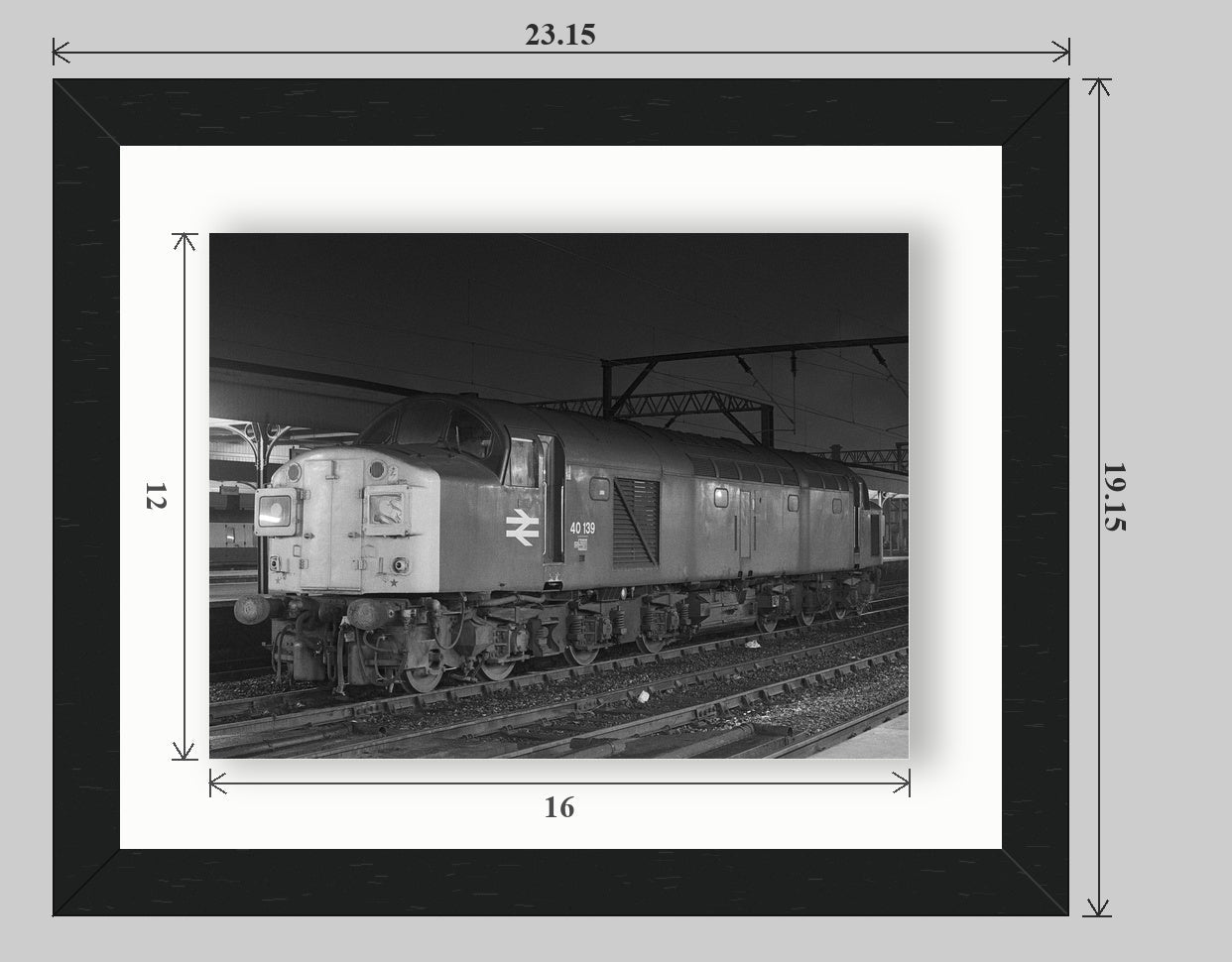
Seen on 23rd February 1979, Class 40 40139 sits on the centre road at Stockport station awaiting its next duty at 00.15 am. There are no notes for this photograph, so we can only guess as to what service it worked next. An educated guess may be that it was taking over 4M08, the 02.22 am parcels service to Bolton, 18.45 ex-Cardiff, or even the Shrewsbury to York.
Choose your format
Available as a photographic print, matted print, Sanctuary framed print, Fine Art tray frame, or Limited Edition Fine Art float frame. Choose a product type, then select an available size and paper or finish.
Print Paper
We offer standard Gloss and Lustre finishes for all prints. In addition we offer a slightly more expensive Velvet paper which is a smooth archival paper with slightly more weight and less prone to reflections.
Print finishes are always subjective, and everyone has their own personal taste. For Black and White prints, we would always recommend choosing a Fine Art paper. Our personal favourite is the Hahnemühle Photo Rag 308gsm paper. This paper shows off contrast in Black and White photographs, and reduces glare from indirect light when displayed on a wall at home.
Delivery
All Prints are sent via Royal Mail 48 Tracked service unless the order exceeds £75.00, in which case they are shipped via DPD courier.
Matted Print
The Matted Print is a card-backed print with a cut-out window, also called a mat or mount, that forms a border around the print itself. The mat acts as a protective layer, preventing the print surface from coming into direct contact with the frame's acrylic glazing. This separation helps protect the artwork from potential damage caused by condensation, moisture, or sticking to the glazing over time.
The Matted Print is ready to be put into a frame of your choice. Further details can be found here.
All Matted Prints are sent via Royal Mail 48 Tracked service unless the order exceeds £75.00, in which case they are shipped via DPD courier.
Our Recommendation
Print finishes are always subjective, and everyone has their own personal taste. For Black and White prints, we would always recommend choosing a Fine Art paper. Our personal favourite is the Hahnemühle Photo Rag 308gsm paper. This paper shows off contrast in Black and White photographs, and reduces glare from indirect light when displayed on a wall at home. If you prefer a paper with a glossier appearance, then the Hahnemühle Fine Art Pearl 285gsm paper is the best choice.
Sanctuary Framed Print
The Sanctuary Frame Print is a classic wooden frame. For this print we only offer a Charcoal Black frame, in 14" × 11" or 20" × 16" sizes, with a 12" × 9" print or 16" × 12" print size. The print comes with a double mount, black outer and white inner. The frame has an acrylic glaze and a black rear-cover. The frame comes with an enhanced hanging system. Further details can be found here.
These products are delivered by DPD courier.
Our Recommendation
Print finishes are always subjective, and everyone has their own personal taste. For Black and White prints we would always recommend choosing a Fine Art paper. Our personal favourite is the Hahnemühle Photo Rag 308gsm paper. This paper shows off contrast in Black and White photographs, and reduces glare from indirect light when displayed on a wall at home. If you prefer a paper with a glossier appearance then the Hahnemühle Fine Art Pearl 285gsm paper is the best choice.
Fine Art Tray Frame
The Fine Art Tray Frame combines Fine Art Pearl paper and a tray-frame moulding, creating a luxurious finished product. Fine Art Pearl has a textured surface with a subtle sheen, which is preserved and enhanced with a protective laminate. There is no paper choice for this product: it is supplied on Fine Art Pearl as standard. For this product we only offer a Black frame, in 16" × 12" or 24" × 18" sizes. The frame comes with an enhanced hanging system. Further details can be found here.
These products are delivered by DPD courier.
Our Recommendation
This product is only available with Fine Art Pearl paper, which is then coated to preserve the surface. We have chosen a black frame to complement the print.
Fine Art Float Frame
The Fine Art Float Frame combines Fine Art Cotton Smooth paper that floats above the back of the frame. There is no paper choice for this product: it is supplied on Fine Art Cotton Smooth as standard. We offer only one size for this product, a 20" × 16" frame with a 16" × 12" print. The frame comes with an enhanced hanging system. Further details can be found here.
This product is delivered by DPD courier.
Limited Edition — only 72 available
This is a Limited Edition product, with only 72 being made — each with a Limited Edition Certificate. When they're gone, they're gone!


Collapsible content
Size Guide
- Prints are available in 12 × 9, 16 × 12 and 24 × 18 inch sizes.
- Matted Prints come as a 12 × 9 inch image in a 14 × 11 inch mount, or a 16 × 12 inch image in a 20 × 16 inch mount.
- Sanctuary Framed Prints are offered in the same image sizes, presented in 14 × 11 or 20 × 16 inch frames.
- Fine Art Tray Frames are available in 16 × 12 and 24 × 18 inches.
- The Limited Edition Fine Art Float Frame is offered as a 16 × 12 inch image in a 20 × 16 inch frame.
Shipping
All Prints and Matted Prints are sent via Royal Mail 48 Tracked service unless the order exceeds £75.00, in which case they are shipped via DPD courier.
All framed products are shipped by DPD Courier.
Returns & Warranty
Please contact us at info@memoriesofmotion.co.uk before returning anything, including your order number and photographs where an item is damaged, faulty or incorrect.
Eligible unused items may be returned within 30 days, while UK customers also have statutory cancellation rights for qualifying purchases; change-of-mind return postage is normally the customer’s responsibility.
Personalised, made-to-order and print-on-demand products—including most photo prints, wall art, clothing and merchandise—cannot usually be returned or exchanged once production has begun, although this does not affect your rights if an item is damaged, faulty, incorrect or not as described.
Approved refunds are returned to the original payment method, normally within 10 business days. Read the full Returns and Refunds Policy.
Frequently Asked Questions
Photo Product FAQ
What types of photo product are available?
Each photograph is available as an unframed Print, a Matted Print, a Sanctuary Framed Print, a Fine Art Tray Frame or a Limited Edition Fine Art Float Frame. Select your preferred Product Type first, then choose from the sizes and finishes available for that format.
What sizes can I choose?
Prints are available in 12 × 9, 16 × 12 and 24 × 18 inches. Matted Prints use a 12 × 9 inch image in a 14 × 11 inch mount, or a 16 × 12 inch image in a 20 × 16 inch mount. Sanctuary Framed Prints offer the same image sizes in 14 × 11 or 20 × 16 inch frames. Fine Art Tray Frames are available in 16 × 12 or 24 × 18 inches, while the Fine Art Float Frame contains a 16 × 12 inch image in a 20 × 16 inch frame.
Which papers and finishes are available?
Unframed Prints are offered in Lustre, Gloss, Velvet and Hahnemühle Photo Rag. Matted and Sanctuary Framed Prints are available in Lustre, Gloss, Photo Rag and Fine Art Pearl. Fine Art Tray Frames use Fine Art Pearl as standard, while Fine Art Float Frames use Fine Art Cotton Smooth.
What is the difference between the framed products?
The Sanctuary Framed Print is a classic black wooden frame with a black-and-white double mount, acrylic glazing and an enhanced hanging system. The Fine Art Tray Frame presents a laminated Fine Art Pearl print within a black tray-frame moulding. The Fine Art Float Frame uses Fine Art Cotton Smooth paper, with the print appearing to float above the back of the frame.
Will the finished print look exactly like it does on my screen?
The product images provide a close guide, but colour, contrast, crop and apparent size can vary slightly between screens and the finished paper, mount or frame. Please check your selected Product Type, size and finish carefully before ordering.
Are photo products made to order?
Yes. Our photographic products are produced to your selected specification by a specialist photographic print partner, including Loxley Colour, and are normally shipped directly to you. Your purchase and customer service relationship remains with Memories of Motion.
Can I change or cancel my order?
Please contact us immediately if you need to change an order or delivery address. Because photographic products are made to order, changes or cancellations may not be possible after production has begun. Email info@memoriesofmotion.co.uk with your order number as soon as possible.
How long will my order take?
Delivery time includes both production and transit. Simple prints are normally quicker to produce than mounted or framed products, while busy periods may increase production times. The best available delivery estimate and charge will be shown at checkout; dates are estimates unless expressly stated otherwise. See the Shipping Policy.
How will my order be delivered?
Prints and Matted Prints are normally sent using Royal Mail Tracked 48, with orders over £75 generally sent by DPD. Framed products are normally delivered by DPD. The available service may vary according to the product, destination, parcel size and checkout options. Tracking details are provided by email where available.
Can photo products be delivered internationally?
The destinations and delivery services currently available for your selected product and address will be shown at checkout. International orders may be subject to local import VAT, customs duties or handling charges that are not included unless checkout expressly says otherwise.
Will everything in my order arrive together?
Not necessarily. Photo products, books, clothing and other merchandise may be made and dispatched by different fulfilment partners, so one order can arrive in separate parcels on different dates. You may receive more than one dispatch email or tracking number.
Can I return a photo product if I change my mind?
Because photo products are made specifically to your selected size, finish and frame, they cannot usually be returned or exchanged for a change of mind once production has started. This does not affect your statutory rights if an item is damaged, faulty, incorrect or not as described. Always contact us before returning anything. See the Returns and Refunds Policy.
What should I do if my order arrives damaged or incorrect?
Keep the product and all its packaging, then contact info@memoriesofmotion.co.uk as soon as possible with your order number, a description of the problem and clear photographs. Once confirmed, an appropriate remedy may include a replacement, repair, full refund or partial refund, with reasonable return postage covered where a return is required.
What makes the Fine Art Float Frame a limited edition?
Only the stated number of Fine Art Float Frames will be produced for each photograph. Every one is supplied with a Limited Edition Certificate; once that edition has sold out, no more will be made.
How are my payment and personal details handled?
Payments are processed securely through Shopify and its payment providers; Memories of Motion does not store complete card details on its own systems. Personal information is used where necessary to process payment, fulfil and deliver your order, provide support and meet legal obligations. See the Privacy Policy.
One policy inconsistency needs attention before publication: the current Shipping Policy says Loxley products are configured for Great Britain delivery, while the live delivery profile was recently verified with UK, US and Canadian zones. The FAQ therefore correctly defers availability to checkout, but the Shipping Policy itself should be updated.
Why Buy From Us
-

Expert Customer Support
Our team of railway historians is on hand to help you find the perfect image for you or your loved one.
-
A photograph should do more than show you a train
Every image in our catalogue has to pass one test before it earns a place there: does it bring the moment flooding back; the sound, the cold platform, the noise building to a crescendo as it pulled away? Most photographs don't. They don't put you back there, at whatever hour it was, in whatever weather, with whatever was going on in your chest at the time. If an image can't do that, we don't sell it.
What arrives at your door isn't a print. It's the moment itself, held still long enough to be lived in again, the thing that stops you mid-step every time you pass it on the stairs, or look at from your seat, and hands the feeling straight back to you, unasked. Something to hang where it can be seen, not tucked in a drawer: to carry with pride, not quietly, the way it always should have been.
